
To enable security key as an additional MFA option, login to https://portal.azure.com with your admin username and password.
Click on Microsoft Entra ID in Azure home page.

Click on Security tab on left panel.

Click on Authentication methods.

Click on Policies then click on FIDO2 security key.

Enable the security key settings by flipping switch to the right.
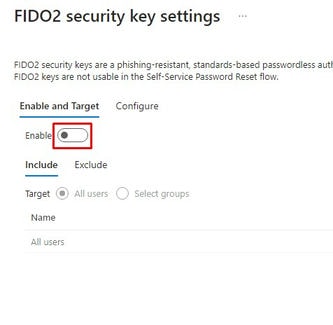
Save the changes once enabled.

You may also refer to https://buy.simplifyit.com.sg/knowledgebase/77/Setting-Up-Security-Key-for-Your-Microsoft-Account.html for information on setting up Trustkey on your Windows PC/laptop.
