
While it may seems like a additional inconvenience to access your mailbox, enabling MFA prevents the aftermath of successful phishing attempts by perpetrators.
Phishing emails sent to your company's email addresses if success in tricking your users to click on URLs in the emails, impersonate common web providers like Microsoft, Google and even banks in an attempt to capture credentials that they may provide and subsequent access these services.
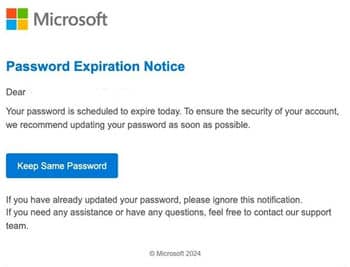
** Typical phishing email format targeting Microsoft users **
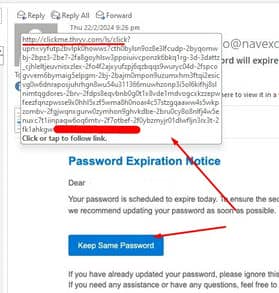
** mouse-over before clicking will show suspicious destination url with nothing in it has any relation to microsoft.com. These are usually compromised server controlled by attacker. **
MFA provides a second layer of authentication, forcing any suspicious logins from unfamiliar locations to verify their logins with a code either through SMS OTPs, authenticator app or security token keys.
This will block compromised accounts' passwords even if they are correct as attackers will have no access to the one-time codes. It will also defeats access to accounts that has previously been successfully bruteforced or collected from infected computers.
MFA can be enabled in your Azure AD admin portal at https://portal.azure.com, under new AAD, Security options.
